- HubPages»
- Games, Toys, and Hobbies»
- Computer & Video Games»
- Video Game Consoles»
- Microsoft Consoles
Xbox 360 Red Ring of Death Repair

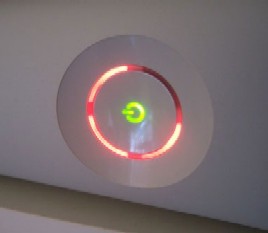
The infamous Red Ring of Death is dreaded by Xbox owners everywhere. The red ring of death, or the three flashing lights around the power switch, indicate a general hardware failure. The red ring of death can be caused by a variety of things, but it always means your Xbox will no longer work.
The red ring of death is different than the four flashing lights around the power switch. Four flashing lights means the Xbox can't detect the AV cable. This problem can be fixed by simply checking to see if the cable is loose or replacing it.
Xbox Red Ring of Death Causes
The Xbox 360 red ring of death is usually caused by the Xbox overheating. The original version of the Xbox had inferior solder connections and a small heat sink that couldn’t dissipate heat fast enough. This caused the Xbox to heat up too much, loosening the connections and damaging the parts inside. Microsoft’s director of product management, Aaron Greenberg, issued a statement in 2009 that said the issues with the Xbox have been fixed and “the worst is behind us”. However, if you own an older Xbox, you still face the possibility that you will experience the dreaded red ring of death.
Xbox 360 Red Ring of Death Repair
If you see the red ring of death on your Xbox, there are a few steps you can take to find out what is causing the problem. Overheating is not the only thing that causes the red ring of death, it can also be caused by a faulty power supply. Look at your power supply to see if the light is green, red or unlit.
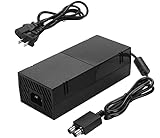
Red or Unlit Power Supply Light
Unplug all of the power supply cords from the Xbox unit, the converter and the wall. Plug them back in, making sure they are securely connected. If this doesn’t work, the outlet or surge protector may be broken. Try plugging your Xbox into another outlet without using a surge protector. If your Xbox still has the red ring of death, let your power supply cool down and then repeat the above steps. If your power supply still has a red light or is unlit, you need to replace the power supply.
Green Power Supply Light
The green light means the power supply is functioning just fine, so the red ring of death is caused by a problem with your Xbox unit. Try turning your Xbox off and unplugging all of the cords. Plug everything back in and turn the Xbox on to see if you were able to reset it and get rid of the red ring of death. If your Xbox still has the red ring of death, then you need to get it repaired.

Fixing the Xbox Red Ring of Death
If your Xbox is still under warranty, Microsoft will repair it at no cost to you. If you don’t have a warranty, you can pay a local game console repair shop to fix it. You can also try fixing the Xbox 360 red ring of death yourself. Any attempt to fix the red ring of death yourself will void your warranty and, if you don’t know what you are doing, you may end up damaging your Xbox more. Make sure any repair guide you use comes from a trusted source.
Prevent the Xbox 360 Red Ring of Death
As they say, an ounce of prevention is worth a pound of
cure. The main thing you can do to prevent the red ring of death from affecting
your Xbox is to keep it cool. This means not playing it for hours on end and
letting it cool down completely before resuming game play. Don’t set your
Xbox on the carpet while you are playing and clean the dust out of the vents
weekly to keep them clear. You can also turn your Xbox upside down to increase
airflow around the bottom vents. Use a table fan or Xbox console cooling system
to remove the heat before it can damage your Xbox. Don’t leave your Xbox on
when you are not playing it; turn it off and unplug it to prevent the red ring
of death. You may still experience the red ring of death even with these precautions, but you will at least have given your Xbox 360 the best chance possible.